Verified update path

Update 1xBet with the right build

Check the version, verify the file, then update without uninstalling first.

Check your 1xBet version

Android comparison covers the four measured pool versions. iOS comparison covers the measured Côte d’Ivoire listing.

Local APK check

The file is read in your browser and is not uploaded. Comparison is against the measured pool, not the newest version worldwide.

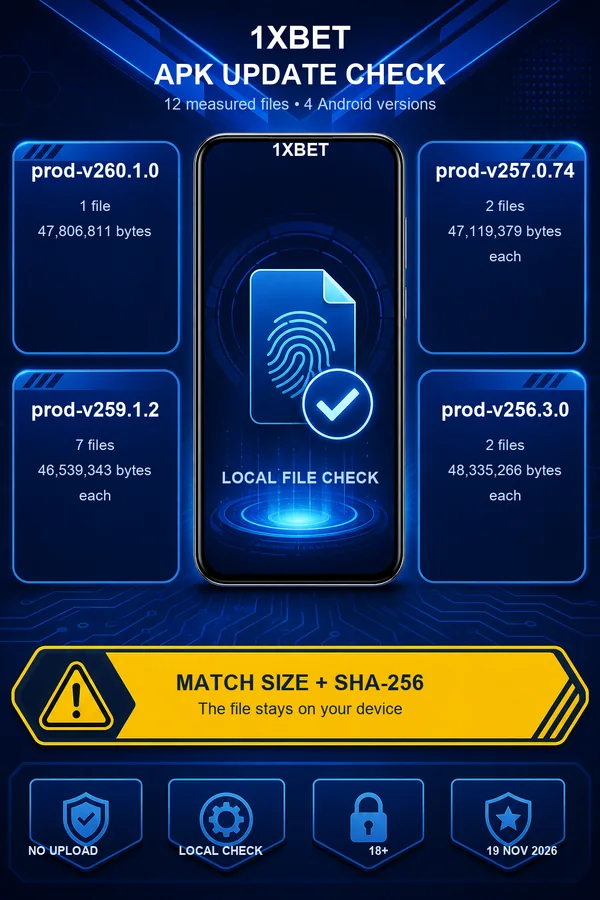
1xBet Android update infographic with 12 measured APK files across four versions and local SHA-256 verification
Compare a selected APK with 12 measured files across four Android versions. The file stays on your device.
Quick answer

This page compares a user-selected Android APK with 12 files measured on the current server on 19 November 2026, across four versions. It runs in your browser and does not upload the file. A match means the size and SHA-256 match one measured file. It does not claim an unknown file is harmful or safe. The old single prod-v257.0.74 reference is not universal, and the comparison is against the measured pool, not the newest version worldwide. It never asks for your account or sign-in details.

Start with the version

1xBet update quick answer and version checker

This independent 1xBet guide helps you compare an installed Android version with four versions measured in the current download pool: prod-v260.1.0, prod-v259.1.2, prod-v257.0.74 and prod-v256.3.0. The comparison does not identify the newest version worldwide or tell you to downgrade a different assigned build.

The local APK check reads a file you select and calculates its size and SHA-256 in your browser. It compares both values with all 12 measured files, including different hashes within one version. Nothing is uploaded, and an unknown result alone does not prove that a file is harmful or safe.

  • Android version comparison: check whether your installed version occurs in the four measured pool versions.
  • Android/iOS path selector: keep the separate App Store route for your region.
  • Local APK check: identify an exact size and SHA-256 match across all 12 measured files without uploading the file.
  • Post-update checklist: confirm sign-in, balance display and app permissions after updating.
File fingerprint

Measured 1xBet Android APK pool

Measured on 19 November 2026: 12 Android APK files across four versions. prod-v260.1.0 has 1 file of 47,806,811 bytes. prod-v259.1.2 has 7 files of 46,539,343 bytes each. prod-v257.0.74 has 2 files of 47,119,379 bytes each. prod-v256.3.0 has 2 files of 48,335,266 bytes each. Individual SHA-256 values differ even within one version. Use the local checker to compare a selected file with every measured hash. The pool is a server snapshot, not a claim about every file offered in every country or account.

prod-v260.1.01 file; 47,806,811 bytes
prod-v259.1.27 files; 46,539,343 bytes each
prod-v257.0.742 files; 47,119,379 bytes each
prod-v256.3.02 files; 48,335,266 bytes each
Total measured files12 files; individual SHA-256 values checked locally
Install over the app

How to update 1xBet over an existing Android installation

The update route installs over an existing compatible app without uninstalling first. This does not guarantee preservation on every device. Back up what you need before updating. Keep your account recovery details available. Before installing, use the local checker to see whether the selected APK matches one of the 12 measured files. If it does not match, confirm the expected facts with the assigned download source or operator instead of treating the old prod-v257.0.74 reference as universal.

  • Download the APK assigned by the current guide route.
  • Select the downloaded file in the local checker; it is not uploaded.
  • Review the exact size and SHA-256 result before installing.
  • Install only over a compatible existing app without uninstalling first.
  • Open 1xBet and sign in with your existing credentials.
Update or reinstall

Clean update or full reinstall decisions for 1xBet

Clean update first

A clean update means installing the new APK over the existing app without deleting app data. This is the low-risk path and should be tried first. A full reinstall means uninstalling the app or clearing app data before installing again. A full reinstall can remove saved login details and local settings, so only consider it after simpler checks fail.

Before a full reinstall

  • Try update over existing app first.
  • Clear cache only, not data, if the app misbehaves after update.
  • Check that you can sign in through the website before uninstalling.
  • Keep your account ID and registered contact details available.
  • Do not share passwords or one-time codes with any guide or third party.
iOS is a separate path

1xBet iOS update path and regional availability

On iOS, update 1xBet through the App Store listing available in your region. The measured listing for this guide is the Côte d'Ivoire storefront only: version 258.0, minimum iOS 15.0, seller 1XCorp N.V., file size 299,422,720 bytes, release date 2026-10-06T06:14:01Z. This guide does not claim that the same app exists in every App Store, and it does not claim that the old global app ID 844035425 is available.

Measured iOS listing facts (Côte d'Ivoire storefront)
LabelValue
Version258.0
Minimum iOS15.0
Seller1XCorp N.V.
Size299,422,720 bytes
Release date2026-10-06T06:14:01Z
Low-risk recovery

1xBet update errors and low-risk recovery

If the 1xBet update fails, work from low-risk checks to higher-risk steps. Confirm your connection and free storage, then use the local checker to compare the APK with the measured pool. A mismatch is unknown, not proof of harm or safety; confirm the assigned file before installing. If the installer refuses a matched update, check package compatibility and avoid clearing app data first.

  • Check connection and free storage.
  • Check the APK locally against all 12 measured file fingerprints.
  • Clear cache only, not data.
  • Switch network and restart the device.
  • Use official 1xBet support if the problem continues.
After the update

Post-update checks and 1xBet account safety

After updating 1xBet, open the app and sign in with your existing account. Check that your balance and bet history display correctly, and that any permissions you previously granted still work. If the app asks for new permissions, review them before accepting. Run through the post-update checklist: confirm the version number, confirm sign-in works, confirm the app opens without crashing, and confirm you can reach the account or support pages you need.

  • Version number matches the expected build.
  • Sign-in works with existing credentials.
  • Balance and bet history display correctly.
  • App permissions are reviewed.
  • No password or one-time code was shared with this guide.
Questions

1xBet questions and answers

Open the 1xBet app and look for the version number in its settings or about screen. On Android, compare it with prod-v260.1.0, prod-v259.1.2, prod-v257.0.74 and prod-v256.3.0, the four versions measured in the current pool. Use the local APK checker to identify the exact file, because hashes differ within one version. On iOS, the measured Côte d’Ivoire listing is version 258.0; other regions can differ.

The old single prod-v257.0.74 reference is not universal. The tool compares your file with all 12 measured files, but that is not the newest version worldwide. If your file is unknown, confirm it with the assigned download source or operator before installing. Install only over a compatible existing app without uninstalling first, and keep account recovery details available.

App Store availability depends on your region and local rules. The measured listing in this guide is the Côte d'Ivoire storefront only, with version 258.0 and minimum iOS 15.0. This guide does not claim that the same app exists in every App Store. If the app does not appear in your regional App Store, do not change your Apple account region or use someone else's account to force an install. Check the official 1xBet site for your region's current options.

Start with low-risk checks: confirm your internet connection and free storage, then verify the APK size and SHA-256 if you are on Android. Clear the app cache, not app data, and try again. Switching between Wi-Fi and mobile data and restarting the phone can also help. Only consider a full reinstall if you can recover your account, because uninstalling or clearing data can remove saved login details. If problems continue, contact official 1xBet support.

An update over the existing app normally keeps your account access because the account is tied to 1xBet's service, not to the local app file. Your balance and bet history are server-side account data. However, this guide does not guarantee data preservation for every device, every reinstall path or every uninstall. Before any uninstall or Clear Data step, make sure you can sign in another way and that you know your account recovery details.

Download APK